Citus sharding technology
Citus Use Cases
Multi-Tenant
The multi-tenant architecture uses hierarchical database modeling to distribute queries across nodes. The tenant ID is stored in a column on each table, and Citus routes queries to the appropriate worker node.
Best practices:
- Partition distributed tables by a common tenant_id column
- Convert small cross-tenant tables to reference tables
- Ensure all queries filter by tenant_id
Real-Time Analytics
Real-time architectures depend on specific distribution properties to achieve highly parallel processing.
Best practices:
- Choose a column with high cardinality as the distribution column
- Choose a column with even distribution to avoid skewed data
- Distribute fact and dimension tables on their common columns
Time-Series
Important: Do NOT use the timestamp as the distribution column for time-series data. A hash distribution based on time distributes times seemingly at random, leading to network overhead for range queries.
Best practices:
- Use a different distribution column (tenant_id or entity_id)
- Use PostgreSQL table partitioning for time ranges
Co-located Tables
Co-located tables are distributed tables that share common columns in the distribution key. This improves performance since distributed queries avoid querying more than one Postgres instance for correlated columns.
Benefits of co-location:
- Full SQL support for queries on a single set of co-located distributed partitions
- Multi-statement transaction support for modifications
- Aggregation through INSERT..SELECT
- Foreign keys between co-located tables
- Distributed outer joins
- Pushdown CTEs (PostgreSQL >= 12)
Example:
SELECT create_distributed_table('event', 'tenant_id');
SELECT create_distributed_table('page', 'tenant_id', colocate_with => 'event');
Reference Tables
Reference tables are replicated across all worker nodes and automatically kept in sync during modifications. Use them for small tables that need to be joined with distributed tables.
SELECT create_reference_table('geo_ips');
Scaling Shards
Adding a new shard is simple - increase the clusters field value in the shards section:
apiVersion: stackgres.io/v1alpha1
kind: SGShardedCluster
metadata:
  name: my-sharded-cluster
spec:
  shards:
    clusters: 3  # Increased from 2
After provisioning, rebalance data using the resharding operation:
apiVersion: stackgres.io/v1
kind: SGShardedDbOps
metadata:
  name: reshard
spec:
  sgShardedCluster: my-sharded-cluster
  op: resharding
  resharding:
    citus: {}
Distributed Partitioned Tables
Citus allows creating partitioned tables that are also distributed for time-series workloads. With partitioned tables, removing old historical data is fast and doesn’t generate bloat:
CREATE TABLE github_events (
  event_id bigint,
  event_type text,
  repo_id bigint,
  created_at timestamp
) PARTITION BY RANGE (created_at);

SELECT create_distributed_table('github_events', 'repo_id');

SELECT create_time_partitions(
  table_name         := 'github_events',
  partition_interval := '1 month',
  end_at             := now() + '12 months'
);
Columnar Storage
Citus supports columnar storage for distributed partitioned tables. This append-only format can greatly reduce data size and improve query performance, especially for numerical values:
CALL alter_old_partitions_set_access_method(
  'github_events',
  '2015-01-01 06:00:00' /* older_than */,
  'columnar'
);
Note: Columnar storage disallows updating and deleting rows, but you can still remove entire partitions.
Creating a basic Citus Sharded Cluster
Create the SGShardedCluster resource:
apiVersion: stackgres.io/v1alpha1
kind: SGShardedCluster
metadata:
  name: cluster
spec:
  type: citus
  database: mydatabase
  postgres:
    version: '15'
  coordinator:
    instances: 2
    pods:
      persistentVolume:
        size: '10Gi'
  shards:
    clusters: 4
    instancesPerCluster: 2
    pods:
      persistentVolume:
        size: '10Gi'
This configuration will create a coordinator with 2 Pods and 4 shards with 2 Pods each.
By default the coordinator node has a synchronous replica to avoid losing any metadata that could break the sharded cluster.
The shards are where sharded data lives and have a replica in order to provide high availability to the cluster.
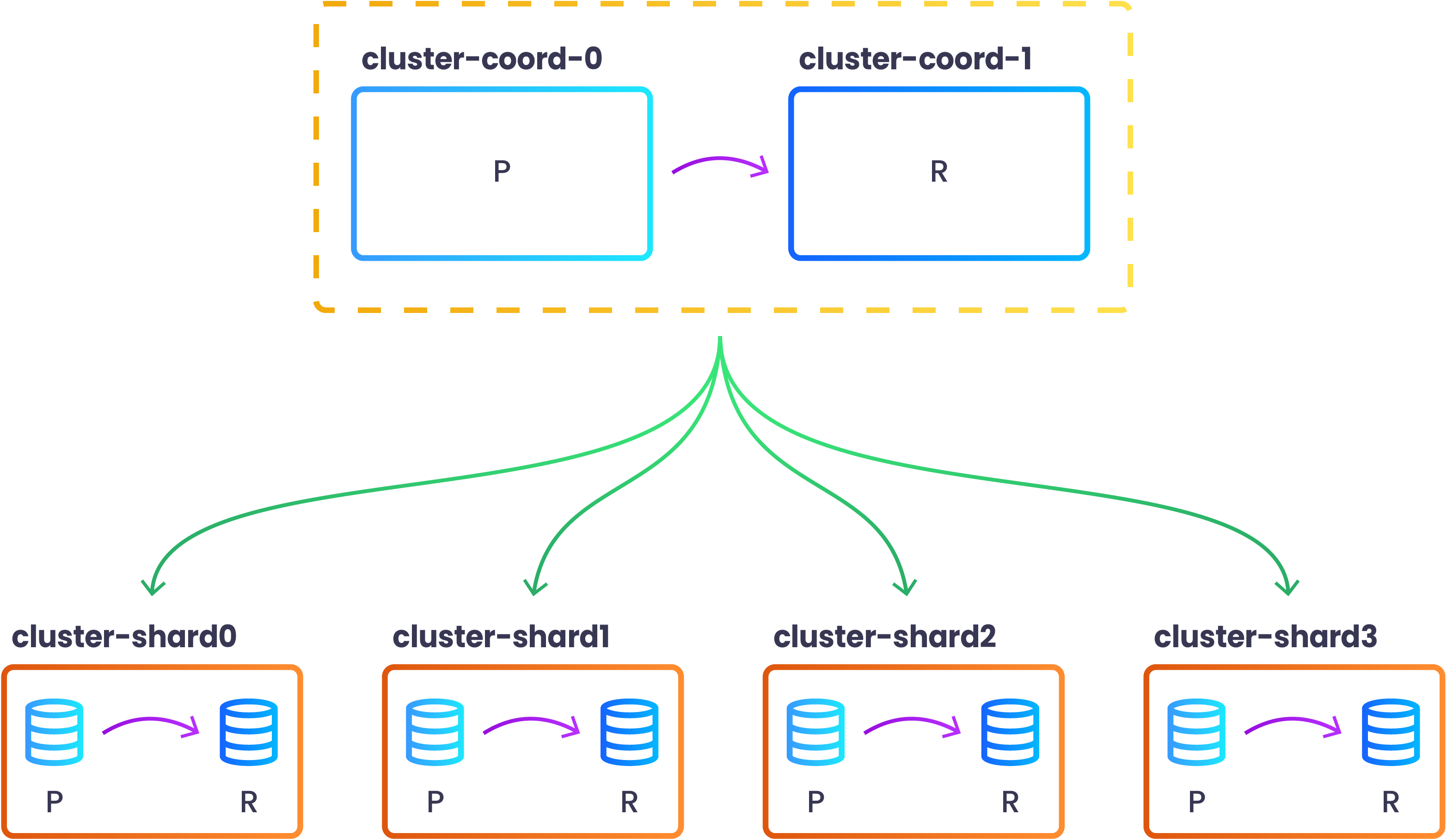
After all the Pods are Ready you can view the topology of the newly created sharded cluster by issuing the following command:
kubectl exec -n my-cluster cluster-coord-0 -c patroni -- patronictl list
+ Citus cluster: cluster --+------------------+--------------+---------+----+-----------+
| Group | Member           | Host             | Role         | State   | TL | Lag in MB |
+-------+------------------+------------------+--------------+---------+----+-----------+
|     0 | cluster-coord-0  | 10.244.0.16:7433 | Leader       | running |  1 |           |
|     0 | cluster-coord-1  | 10.244.0.34:7433 | Sync Standby | running |  1 |         0 |
|     1 | cluster-shard0-0 | 10.244.0.19:7433 | Leader       | running |  1 |           |
|     1 | cluster-shard0-1 | 10.244.0.48:7433 | Replica      | running |  1 |         0 |
|     2 | cluster-shard1-0 | 10.244.0.20:7433 | Leader       | running |  1 |           |
|     2 | cluster-shard1-1 | 10.244.0.42:7433 | Replica      | running |  1 |         0 |
|     3 | cluster-shard2-0 | 10.244.0.22:7433 | Leader       | running |  1 |           |
|     3 | cluster-shard2-1 | 10.244.0.43:7433 | Replica      | running |  1 |         0 |
|     4 | cluster-shard3-0 | 10.244.0.27:7433 | Leader       | running |  1 |           |
|     4 | cluster-shard3-1 | 10.244.0.45:7433 | Replica      | running |  1 |         0 |
+-------+------------------+------------------+--------------+---------+----+-----------+
You may also check that they are already configured in Citus by running the following command:
$ kubectl exec -n my-cluster cluster-coord-0 -c patroni -- psql -d mydatabase -c 'SELECT * FROM pg_dist_node'
 nodeid | groupid |  nodename   | nodeport | noderack | hasmetadata | isactive | noderole | nodecluster | metadatasynced | shouldhaveshards
--------+---------+-------------+----------+----------+-------------+----------+----------+-------------+----------------+------------------
      1 |       0 | 10.244.0.34 |     7433 | default  | t           | t        | primary  | default     | t              | f
      3 |       2 | 10.244.0.20 |     7433 | default  | t           | t        | primary  | default     | t              | t
      2 |       1 | 10.244.0.19 |     7433 | default  | t           | t        | primary  | default     | t              | t
      4 |       3 | 10.244.0.22 |     7433 | default  | t           | t        | primary  | default     | t              | t
      5 |       4 | 10.244.0.27 |     7433 | default  | t           | t        | primary  | default     | t              | t
(5 rows)
Please, take into account that the groupid column of the pg_dist_node table is the same as the Patroni Group column above. In particular, the group with identifier 0 is the coordinator group (coordinator have shouldhaveshards column set to f).
For a more complete configuration please have a look at Create Citus Sharded Cluster Section.